How to Register at CHEXX
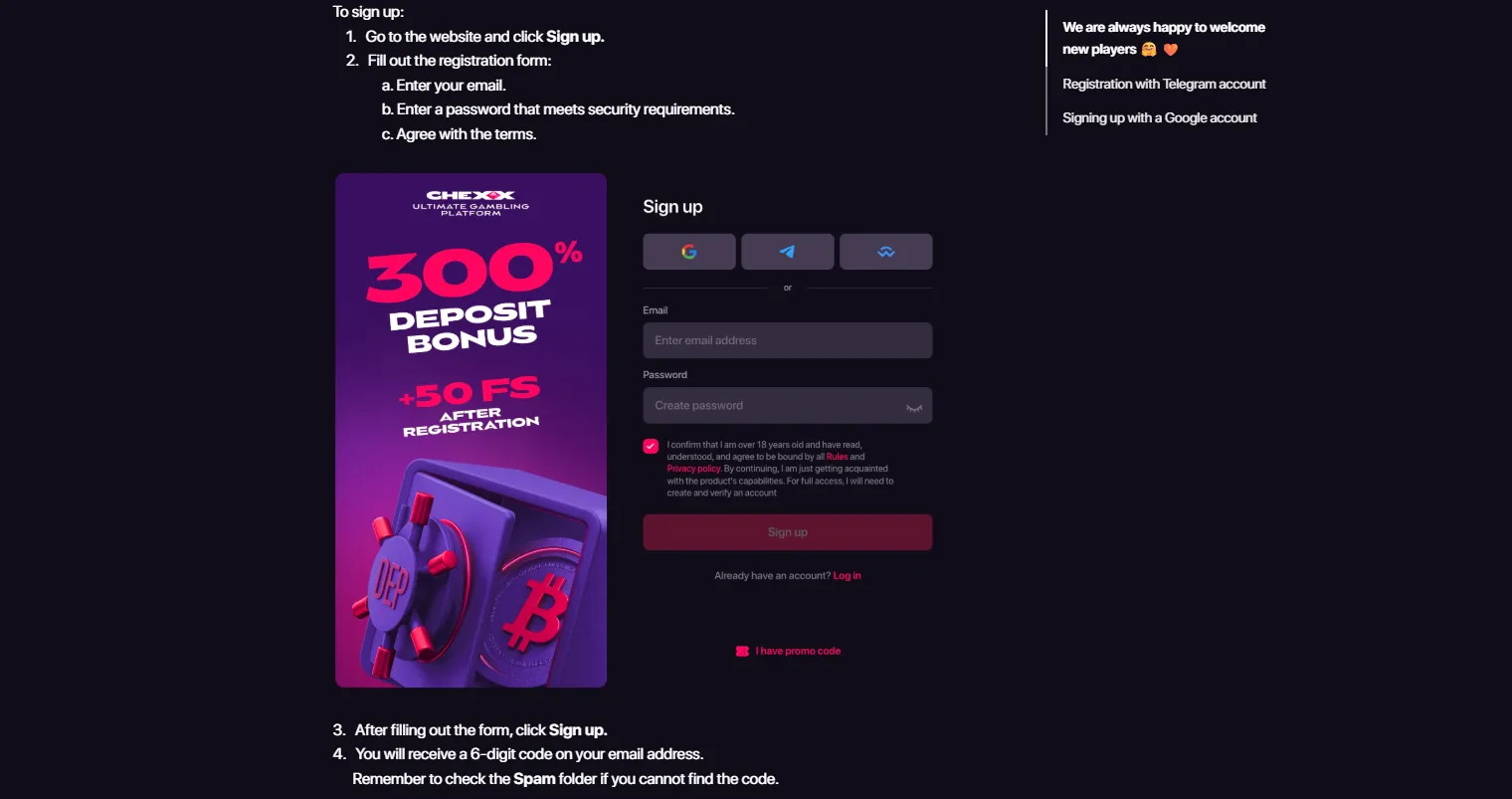
To register at CHEXX, open the current CHEXX site and choose one of the documented account routes: email, Google, Telegram or WalletConnect. The exact fields visible can vary by route, so this guide does not invent form inputs that are not confirmed in the live interface.
For Philippines readers, the current general Terms do not name the Philippines in the prohibited-jurisdiction list. That means the country is not explicitly excluded by that list, but a successful registration does not prove PAGCOR licensing or guarantee that every payment route will be available locally.
The full picture is in our CHEXX review for the Philippines.
Step 1: open the current CHEXX registration interface
Start from the official CHEXX site and use the registration control shown in the current interface. Because the page is updated over time, rely on the live labels rather than an older saved reference or a third-party form reconstruction.
Step 2: choose your sign-up route
CHEXX registration is documented with four options: email, Google, Telegram and WalletConnect. Choose the route you already know how to secure and recover.
- Email: useful if you want a conventional account identity.
- Google: convenient if your Google account already has strong security and recovery settings.
- Telegram: fits users who already use CHEXX’s Telegram ecosystem.
- WalletConnect: aimed at users comfortable connecting a compatible crypto wallet.
Do not share a wallet seed phrase or private key during registration. A normal wallet connection should never require handing those secrets to the casino.
Step 3: complete only the fields shown in the live form
Different registration routes can request different information. Follow the fields that CHEXX actually displays for your selected method and review any terms or declarations before continuing.
A fixed set of mandatory form fields is not listed because the live interface can change. That is more reliable than presenting an old form layout as permanent.
Step 4: secure account recovery
After creating the account, review the security and recovery controls associated with the login method you chose. If you used email or Google, secure that underlying account. If you used Telegram, protect the Telegram session and recovery path. If you used WalletConnect, keep wallet recovery secrets offline and private.
CHEXX’s profile documentation includes password, linked-account and confirmation-code controls. Review these before moving meaningful funds into the account.
Step 5: review the profile before depositing
The CHEXX profile links to Wallet, Transactions, My bets, Bonuses and Verification. It also provides controls for linked accounts, notifications, interface language and display currency.
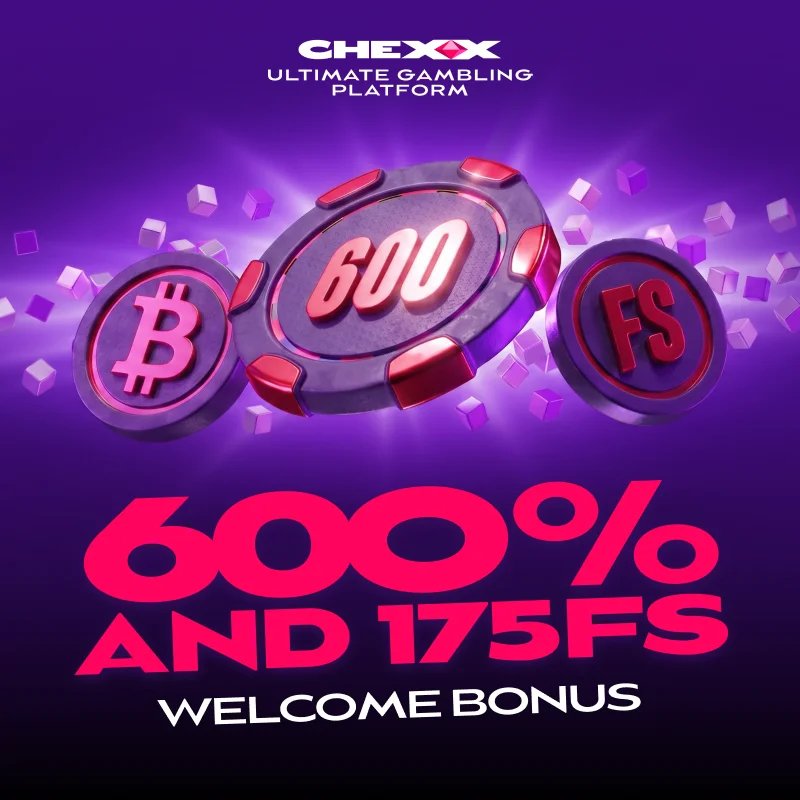
Take a minute to locate Transactions and Verification before making a deposit. Knowing where account activity and compliance controls live is useful if a later payment or review needs attention.
What happens after registration
Registration does not necessarily complete every account check. CHEXX applies risk-based due diligence and may request enhanced KYC. That means a user can move from account creation into a later verification stage depending on the circumstances.
The exact document list and verification time are not stated here because those are high-risk details that require current direct evidence. The separate CHEXX KYC is the right place for verification-specific discussion.
Philippines access: what registration does and does not show
The Philippines is not named in the current CHEXX general Terms prohibited-jurisdiction list. This supports a practical registration guide for Philippines readers, but it is not the same as a finding that CHEXX is locally licensed.
No PAGCOR local licence or registration has been verified for CHEXX. Do not interpret a working registration screen, account creation or successful login as proof of local regulatory approval.
Do not assume a local payment method will appear
Creating an account also does not guarantee that a familiar Philippines payment option such as GCash or Maya will be available. CHEXX’s verified payment model is crypto-focused, and direct support for those local e-wallets has not been verified.
Before depositing, read the CHEXX deposit and check the current cashier. If you use crypto, the asset and blockchain network must match the receiving details shown by CHEXX.
Registration checklist
- Open the official CHEXX site.
- Choose email, Google, Telegram or WalletConnect.
- Complete only the information requested by the live registration route.
- Review the terms and country declaration shown to you.
- Secure the login and recovery method.
- Open the profile and locate Transactions and Verification.
- Check the current cashier before planning a deposit.
If a field, country option or registration method differs from an older saved reference, follow the current CHEXX interface rather than the older image.
Common registration mistakes to avoid
Do not create an account around an email address or social identity you may lose. Do not use an unknown wallet connection prompt, and never reveal a wallet seed phrase. Do not assume that registration removes later KYC, and do not treat country availability as proof of local licensing.
Another common mistake is funding immediately without checking the deposit network. Account registration and crypto network selection are separate steps, and an address or network error can be much harder to undo than a login mistake.

When to use the broader account guide
This page focuses on opening the account. For the wider account lifecycle – including security, later verification and how the profile fits with payments – use the parent CHEXX account.
Keeping the two pages separate avoids turning a short registration sequence into a duplicate KYC or payments article.
Email, Google, Telegram or WalletConnect: which route is simplest?
There is no single best route for every Philippines user. Email is straightforward when you want a standalone account identity. Google can reduce login friction if you already secure that account carefully. Telegram is convenient for users who already use the service as a regular communication channel. WalletConnect can fit a crypto-native workflow, but it assumes you understand wallet security.
Whichever route you choose, keep the same principle: the identity should be recoverable without exposing sensitive secrets. A faster sign-up is not useful if the underlying account is temporary, shared or poorly protected.
What not to read into a successful sign-up
A successful registration confirms that the interface accepted the account-creation path at that moment. It does not confirm local licensing, future bonus eligibility, a specific payment method, withdrawal timing or freedom from later KYC.
Those are separate facts with separate evidence. Keeping them separate prevents a common mistake in casino guides, where a working registration screen gets turned into a broad claim that every part of the service is available on the same terms.
Before leaving the registration screen
Check that you understand how you will return to the account. If a confirmation step is shown, complete it through the channel displayed by CHEXX. Do not rely on a browser session staying open indefinitely.
Once inside, visit the profile and make sure you can identify Wallet, Transactions and Verification. This is more useful than rushing directly to a deposit because these areas are where later account and payment issues are most likely to be reviewed.
For Philippines users, this separation is especially useful because country access, local regulation and the crypto cashier answer different questions. Check each one on its own evidence before funding the account.
How the four registration routes differ in practice
The four documented routes lead to the same basic goal – creating access to a CHEXX account – but they place account recovery in different hands. With email, recovery depends on continued access to that mailbox. With Google, your CHEXX access is tied to the security of the Google identity you choose. Telegram likewise depends on keeping control of the connected Telegram account. WalletConnect is different because it links a compatible crypto wallet, so wallet security becomes part of the account-access decision.
This distinction is worth making before sign-up rather than after it. Choose a route you expect to keep long term, secure it first, and avoid using a temporary identity merely because it makes the first login quicker. Registration convenience and account recoverability are separate considerations.
Country declaration and account setup are not payment approval
If the live registration flow asks for a country declaration or other account-setting information, complete what the interface actually requests and review it before submission. The Philippines not being named in the general Terms prohibited-jurisdiction list does not mean every cashier option, bonus condition or later verification step is guaranteed to be available in the same way.
This is why the registration process should be treated as account setup only. Deposit availability is checked in the cashier, verification is handled through the account compliance flow, and local regulatory status is a separate question. Keeping those stages distinct prevents a successful sign-up from being mistaken for proof about payments or licensing.
A useful first-session sequence after account creation
After the first successful login, check the profile before choosing a game or sending crypto. Confirm that you can return through the login route you selected, identify the Transactions area, locate Verification and open the Wallet section. Then review the current deposit screen and compare the asset and network shown there with the route you intend to use.
If anything differs from an older instruction – a missing sign-up route, a changed country field, a different network or an additional account check – use the current CHEXX interface. This approach keeps the registration guide useful without pretending that form layouts and account controls never change.
What may be asked later: the KYC checks.
Frequently asked questions
What registration methods does CHEXX support?
CHEXX supports email, Google, Telegram and WalletConnect registration routes.
Can I register from the Philippines?
The Philippines is not named in the current general Terms prohibited-jurisdiction list. That does not establish local licensing or guarantee every downstream service.
Does signing up mean I will not need KYC?
No. CHEXX applies risk-based due diligence and may request enhanced KYC.
Does registration guarantee GCash or Maya deposits?
No. Direct GCash and Maya support has not been verified in the CHEXX cashier.
Related coverage: CHEXX casino Philippines.
 GemonexBetixon
 Sevens HighRoyal Slot Gaming (RSG)
 ReactoonzPlay'n GO
 Sugar RushPragmatic Play
 Sizzling Hot DeluxeNovomatic
 Sweet BonanzaPragmatic Play
 Strength of HerculesHacksaw Gaming
 Gates of OlympusPragmatic Play
 Mystic Fortune DeluxeHabanero
 StarburstNetEnt
 Sweet FTNGameArt
 CleopatraIGT
 Wild FudgeBetixon
 Epic JourneyRed Tiger Gaming
 American BlackjackClassic
 Turbo BlackjackFast-play
 Atlantic City BlackjackClassic
 Single Deck Blackjack GoldSingle Deck
 Classic BlackjackClassic
 Double Exposure BlackjackDouble Exposure
 Blackjack 21 ClassicClassic
 Vegas Downtown Blackjack GoldGold Series
 Vegas Strip BlackjackClassic
 Blackjack Lucky LadiesSide Bet
 Blackjack Surrender OriginsSurrender
 Multihand BlackjackMultihand
 Ultimate Blackjack with RachaelLive-style
 European BlackjackMultihand
 Premier Blackjack with Side BetsSide Bet
 European RouletteClassic
 Dragon RouletteThemed
 Gold RouletteGold Series
 Mega Fire Blaze RouletteMultiplier
 Roca Riches RouletteThemed
 French RouletteNetEnt
 RouletteRelax Gaming
 Quantum RouletteMultiplier
 Lucky RouletteClassic
 Immortal Romance RouletteThemed
 Auto RouletteSwitch Studios
 American RouletteClassic
 Mini Roulette 3DMini
 Multifire RouletteMultiplier
Written by the editors at Chexx Casino.